
VIP Kart · Print-Ready Artwork Guide
Prepare Your Plastic Card Artwork the Right Way
Set up your PVC, RFID, staff, membership and student card designs with the correct dimensions, safe zone, bleed and print standards — for faster production, sharper print and fewer revisions.
Standard Plastic Card Dimensions
85.6 × 54
mm — Finished card (CR-80)
Same standard size as bank and ID cards; 0.76 mm thick.
3 mm
Safe zone
Keep logos, text, barcodes and QR codes at least this far from the edge.
+3 mm
Bleed
Extend edge-to-edge backgrounds and images beyond the cut line.
Set your canvas to 91.6 × 60 mm. No need to round the corners in your artwork — the radius is created during cutting.
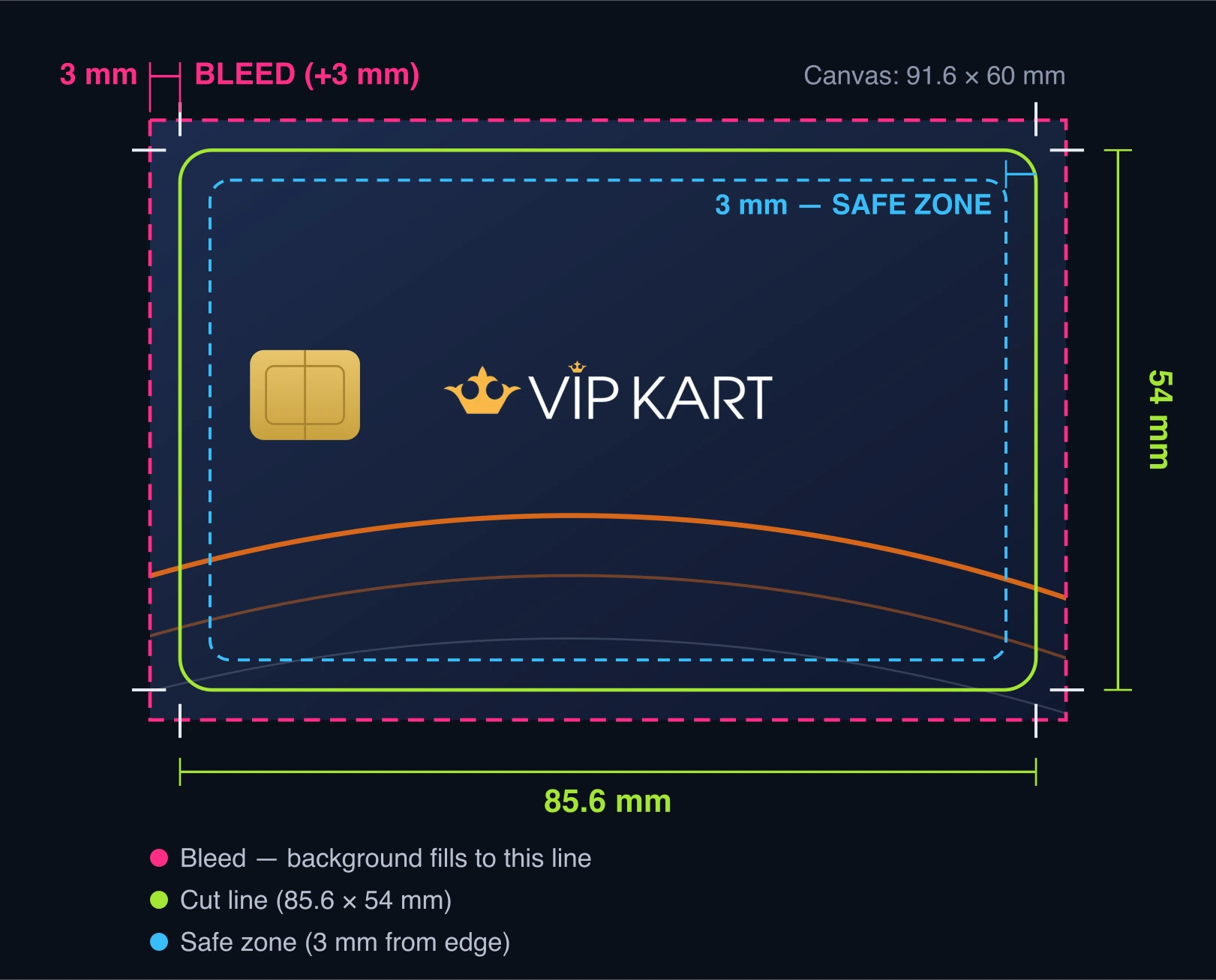
Bleed and Safe Zone
- Background colours and photos must extend to the bleed area.
- Logos, names, card numbers and QR codes stay inside the safe zone.
- Never place important content too close to the card edge.
- Never put text or logos in the bleed — that zone is trimmed away.
- Convert fonts to outlines or embed them in the PDF.
Correct vs Wrong Artwork
Preparing the background to the bleed edge prevents white lines on the card edges.
✓ Correct design
VIP KART
Ayşe Yılmaz
The background covers the whole card and extends to the bleed; critical elements sit in the safe zone.
✕ Wrong design
VIP KART
Ayşe Yılmaz
When the background stops at the cut line, unwanted white edges appear.
How to Prepare Cards with Variable Data
Staff, membership and student cards carry different data on every card. The most reliable approach is to send three pieces:
Send the Blank Master
The main design without names, photos, numbers or other variable fields.
Add One Filled-in Sample
A sample card for one person shows field positions and typography.
Send the Data as Excel
Names, departments, numbers and UIDs in XLSX format; we generate barcodes/QR codes for you.
| Card No | Full Name | Department | Staff No | QR / UID |
|---|---|---|---|---|
| 0001 | Jane Smith | Sales | 2451 | … |
| 0002 | John Miller | Accounting | 2452 | … |
| 0003 | Emma Brown | IT | 2453 | … |
Recommended File Standards for Print
Use these technical standards for a professional result.
File Format
Recommended: PDF / PDF-X, AI, EPS, PSD, TIFF. JPG and PNG only at high resolution.
Resolution
At least 300 dpi at card size. Avoid images compressed by messaging apps or taken from the web.
Colour Mode
Prepare in CMYK; RGB neons look dull in print. Share Pantone codes if brand colours are critical.
Fonts
Convert type to outlines or embed fonts in the PDF; avoid type smaller than 6 pt.
QR & Barcodes
Place codes high-contrast, large enough and inside the safe zone.
RFID / Magnetic
State MIFARE, NFC, proximity or magnetic stripe requirements at the ordering stage.
Final Check Before Sending
Run through this short list before sending your file.
- Canvas 91.6 × 60 mm (including 3 mm bleed)?
- Background extends to the bleed area?
- Logo and key content inside the safe zone?
- File at 300 dpi and in CMYK?
- Fonts embedded or outlined?
- Logo in vector format (or 300 dpi transparent PNG)?
- Front and back clearly marked for double-sided cards?
- Variable data correct in the Excel file?
- QR codes and barcodes readable in size?
- RFID / magnetic stripe and Pantone needs stated?
Frequently Asked Questions
I don't have a ready design — what should I do?
No problem — send your logo and the details you want on the card; our design team prepares the artwork for your approval.
I forgot to add bleed — will my file be rejected?
No — we check every file and add bleed where possible; otherwise we request a revision. Files that arrive with bleed reach production much faster.
Is there an approval before printing?
Yes — every job gets a digital mockup before production; printing starts only with your approval.
Send Your File — We Check It for You
We review your artwork for dimensions, bleed, resolution, colour, personalisation and printability — free of charge.